


Uber - Request a ride
4.7437.94K Reviews
App Specs
- Version
- Varies with Device
- Updated On
- License
- Free
- Downloads
- 1,000,000,000+
- Developer
- Uber Technologies, Inc.
- Categories
- Maps & Navigation
- Platform
- Android, iOS
Screenshots

 Analysis by AppCompare
When a pickup stalls, I’ve learned not to assume the app is broken right away. A ride request depends on several things lining up: a clear destination, a usable pickup point, nearby driver availability, and a working connection. If one of those is off, the screen can feel confusing even when the basic service is operating as intended. I find it helps to pause, check the details, and only then decide whether to retry.
Why a request can feel stuck
The most common point of friction is often the pickup location rather than the destination. A map pin placed on the wrong side of a large building, across a divided road, or inside a busy airport area can make it hard for a driver to reach you. Before confirming, I take a moment to compare the pin with a recognizable entrance or curbside spot. If the address is right but the pin is awkward, moving to a simpler meeting point can save more time than repeatedly submitting the same request.
Availability is another practical constraint. A ride-hailing app can show options, but it cannot make a nearby driver appear when demand is high or the area has few drivers. I treat the estimated arrival and fare as planning aids, not promises. If timing matters, I check the pickup details before I leave a building and keep a backup plan in mind, especially for an early airport departure or a late-night trip.
Guides and Analysis on Uber - Request a ride
Small checks before you leave
For a first ride, I would get the basic account and payment setup done while I’m somewhere calm, rather than trying to type everything in a rush at the curb. Confirm that the destination is the intended one, look at the pickup point, and make sure the payment choice is suitable before sending the request. Those simple checks reduce the chance of needing to correct details while a driver is already approaching.
It also helps to think about the trip as a handoff, not just a button press. At a crowded venue, decide where you can safely wait and where a car can reasonably stop. If a friend is travelling with you, agree on the meeting point before requesting. For an airport run, leave room for the walk from the terminal to the pickup area and follow local signs rather than assuming the car can meet you at the nearest door.
Recovering without making the confusion worse
If the app seems unresponsive, I first check whether the phone has a working internet connection and whether the destination or pickup details still look correct. I avoid tapping the request control over and over, because duplicate attempts can make it harder to tell what is happening. If a request is already active, I review its current status before starting another one. When I need to change the plan, I use the controls shown for that trip and read any confirmation carefully.
Once a ride is underway, sharing trip status with someone I trust can be reassuring, particularly when I’m travelling somewhere unfamiliar. I also keep an eye on the route and speak up politely if the route looks unsuitable. Navigation can be imperfect, and a driver may have a reasonable local alternative, so I treat the displayed path as a guide rather than proof that anyone has made a mistake.
Worth Reading Before You Choose

Flipboard Shows What News Apps Must Do Beyond the Feed

Switching to Android Auto Means Rethinking Your Driving Routine

Google Calendar Makes a Crowded Week Easier to Manage

Ludo King Makes the Most of the Minutes Between Plans

Baby Panda World Brings Quick Play to Modern Phones, but Its Game Library Feels Busy

ESPN’s Live Game View Makes Following Close Games Easier
When another explanation is more likely
Not every delay points to a software problem. A difficult curb, a crowded pickup zone, poor mobile reception, heavy traffic, or a shortage of available drivers can all affect the experience. If the app is working but the street is chaotic, walking to a safe, clearly described pickup point may be the better move. If the trip is time-critical and rides are scarce, public transport, a local taxi rank, or another established option may be more dependable for that particular journey.
I also wouldn’t choose a rideshare for every trip by default. For a short, familiar journey with convenient transit, a bus or train may be cheaper and avoid traffic altogether. For a group with bulky luggage, it is worth checking that the ride option suits the people and bags travelling before committing. Uber is most useful when door-to-door convenience matters enough to justify the fare and the wait.
A practical verdict for everyday travel
Ever found yourself stranded without a ride? Well, I’ve been there too, and that’s when I stumbled upon the Uber app. Let me spill the tea on my experience using this ride-sharing app, which has become my go-to travel companion.
What Exactly is Uber?
In case you’re new to the party, Uber is a ride-hailing app that connects riders with drivers in a matter of minutes. It’s like having a personal driver on speed dial, all through your smartphone. Available on both Android and iOS, the app has a slick interface that makes booking rides a breeze.
Getting Started
Setting up an account is a walk in the park. Once you download the app, you just need to sign up with your email or social media account. The app will ask for your payment details, but don’t sweat it; it’s super secure. I was impressed by how quickly I was up and running.
Booking Your First Ride
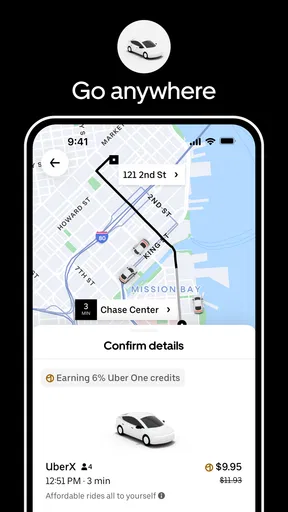
When it comes to booking a ride, simplicity is the name of the game. Just enter your destination, and the app will show you available drivers nearby. What I love is the ability to see an estimated fare before you even hit that request button. Plus, the app offers various ride options depending on your needs, from budget-friendly to luxury rides.
The Ride Experience
Every ride I’ve taken with Uber has been smooth sailing. Drivers are generally courteous and professional. It’s also reassuring to know that you can share your trip status with friends or family if you’re feeling a little cautious. I’ve had a couple of rides where the in-app navigation tried to take the scenic route, but hey, no app is perfect, right?
Why Uber Stands Out
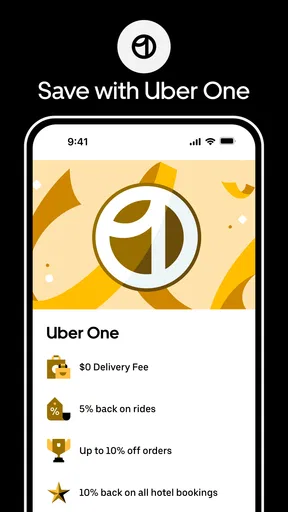
One of the features that stands out is the fare-splitting option. When you’re out with friends, splitting the cost is as simple as tapping a button. Another noteworthy feature is the Uber Rewards program, which lets you earn points for every ride. Accumulate enough points, and you can unlock perks like discounted rides or priority support.
Another thing I really appreciate is the app’s transparency. Uber lets you rate drivers and provides a detailed receipt for every ride. It’s these little touches that make the experience a notch above the rest.
Uber is a free app from Uber Technologies, Inc. in the maps and navigation category, with a 4.7 average from around 19 million ratings and over 1 billion installs. It is rated for everyone and was released on October 28, 2010. Those figures suggest it is familiar to a very broad audience, though popularity alone doesn’t tell me whether a ride will be available on my particular street at a particular moment.
For an everyday example, imagine finishing work in the rain with groceries and a bus stop several blocks away. I’d enter the destination, check that the pickup pin is on the side of the street where I can actually wait, compare the displayed ride choices, and review the fare estimate before requesting. If the estimate or wait is not worth it, I can decide before committing to the pickup. That ability to weigh convenience against cost is more useful than treating the first option on screen as the automatic answer.
Choosing between rideshare, taxi, and transit
Compared with a traditional taxi, a rideshare request puts the destination and estimated fare into the same app flow, which can make planning feel more straightforward. A taxi rank can still be the better choice when cars are already waiting nearby, when mobile service is unreliable, or when local rules make street hailing simple. Transit wins when routes are frequent and the journey is predictable; it avoids road traffic and can be a better fit for a solo trip where door-to-door service is unnecessary. I see Uber as one useful option in that mix, not a replacement for every way of getting around.
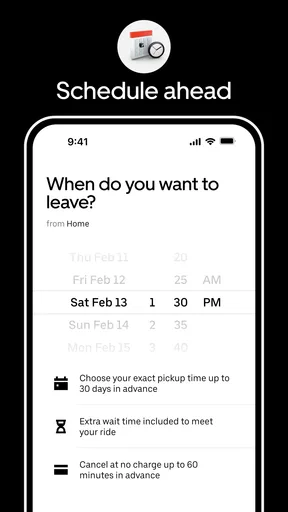
The app is especially handy for visitors who do not know the local streets, people heading home after an event, and travellers who need to compare ride choices before leaving a building. It is less compelling for someone who makes the same short commute every day on a direct train, or for anyone who needs a guaranteed pickup at a precise time. A request is not the same as a scheduled guarantee, so for an appointment where being late would have serious consequences, I would build in extra time or choose a more dependable local arrangement.
Useful habits for airport and group trips
For airport travel, I check the terminal and pickup instructions before walking outside. Airports often separate arrivals, rideshare pickups, and taxi areas, so the nearest-looking curb may not be the right one. I also keep my luggage and companions together before requesting; it is easier to identify the car and board efficiently when nobody is still crossing the terminal. If the pickup zone is crowded, a clear meeting point can reduce the back-and-forth of trying to spot each other.
For a group, fare splitting can make settling up easier, but I would agree on the destination and who is riding before the trip begins. A car’s capacity and luggage space matter more than the number of people who can fit in theory. When bags are large or the group has different drop-off points, compare the available options and decide whether one ride is actually simpler than separate trips. The app can help arrange the journey, but it cannot resolve a disagreement about the plan once everyone is already waiting.
What the fare estimate can and cannot do
I use the fare shown before requesting as a comparison point, not as a reason to stop thinking about the trip. It helps me decide whether the convenience suits my budget, especially when I can compare it with transit or a taxi. I still consider the full situation: walking time to the pickup, the likely wait, traffic, and whether I have enough flexibility if the trip takes longer than expected. A low-looking estimate is not useful if I cannot reach the pickup point easily, and a convenient ride may not be good value for a very short journey.
Receipts are useful beyond checking the total. I like having a record to review after a trip, particularly when I need to keep travel expenses organized. Rating a driver is also a way to leave feedback after the ride, but I try to judge the experience fairly: traffic, a confusing venue exit, or a route change may not be within the driver’s control. If something about the trip seems wrong, I would review the trip details and use the app’s available support path rather than relying on a rating alone to explain the issue.
What to expect from setup and support
The original signup description makes setup sound almost effortless, but I would still allow a few minutes to enter account and payment details carefully. That is especially worthwhile before a late-night trip, when a forgotten password or an incomplete payment setup is more stressful to sort out. If the app does not behave as expected, I start with the basics: check the connection, confirm the destination, close and reopen the app if needed, and avoid repeating a request until I know whether the first one went through. These are ordinary checks, not a guarantee that every issue can be fixed from the phone.
New users may wonder whether they need to understand every ride option before opening the app. I don’t think so. For a first trip, I would choose the option that fits the number of passengers and luggage, review the fare and pickup point, and keep the plan simple. The choices can vary by location, so I would rely on what is actually shown for the trip rather than expecting the same menu everywhere. That approach makes the first ride less daunting without assuming every local service works identically.
Where the experience has real limits
The biggest trade-off is that convenience depends on conditions outside the app: driver supply, traffic, pickup access, and phone connectivity. A polished request screen cannot remove those constraints. I also would not describe every driver or ride as uniformly smooth; my positive experiences do not guarantee another person’s trip will match them. Keeping an eye on the pickup details and route gives me more control, but it does not turn a rideshare into a fully predictable service.
There is also a privacy and comfort decision in sharing a ride with a stranger. I appreciate being able to share trip status with someone I trust, but that option does not replace sensible choices about where I wait, whether the vehicle and trip details match what I expect, and whether I feel comfortable getting in. If something feels wrong, I would step back and reassess rather than letting the pressure to keep the trip moving decide for me.
All in all, the Uber app makes getting around town as easy as pie. Whether you need a quick lift to the airport or a ride home after a night out, Uber has got your back. Sure, there are minor hiccups here and there, but in my book, the convenience it offers far outweighs any downsides.
If you haven’t tried it yet, give it a whirl! You might just find yourself wondering how you ever lived without it.
Pros
- Easy-to-use interface for quick bookings.
- Wide availability in major cities worldwide.
- Multiple payment options for convenience.
- Real-time tracking for safety and assurance.
- Variety of ride options to suit budgets.
Cons
- Surge pricing can be unexpectedly high.
- Driver availability varies by location.
- App may drain battery quickly.
- Limited service in rural areas.
- Customer support can be slow.
FAQs for Uber - Request a ride
How does Uber determine the cost of a ride?
Uber calculates the cost of a ride using a base fare, plus time and distance rates. Prices may vary based on location, demand, and vehicle type. Surge pricing can apply in high-demand situations, increasing the rate temporarily. The app provides an estimated fare before confirming your ride, ensuring transparency.
Is Uber available in my city?
Uber operates in numerous cities worldwide, and availability depends on your location. To check if Uber is available in your city, you can visit the Uber website or download the app and enter your location. The app will inform you whether services are operational in your area.
What safety measures does Uber have in place for riders?
Uber prioritizes rider safety with features like real-time GPS tracking, driver background checks, and an in-app emergency button. Riders can share their trip details with trusted contacts and view driver ratings and profiles before accepting a ride. Regular safety updates and features enhance rider security.
Can I request a specific type of vehicle with Uber?
Yes, Uber offers various vehicle options to suit different needs. Choices range from economy options like UberX to premium options like Uber Black. You can select the type of vehicle you prefer when booking your ride, ensuring that your travel requirements are met with comfort and style.
How do I contact Uber if I encounter an issue during my ride?
If you experience any issues during your ride, you can contact Uber through the app’s Help section. Here, you can report problems, request refunds, or get assistance. Uber’s support team is available to help address any concerns, ensuring a smooth and satisfactory experience for all users.


